
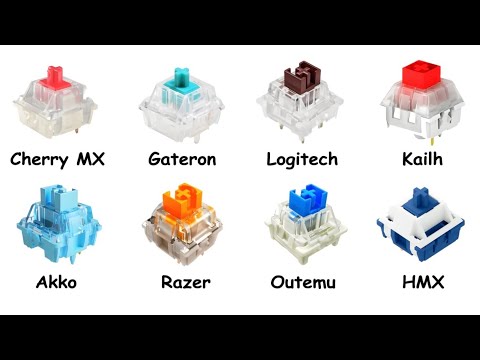
From Cherry MX to HMX — every major mechanical keyboard switch manufacturer covered in a single video. Whether you prefer linear, tactile, or clicky, this breakdown covers what sets each switch apart, how they actually feel under your fingers, and which one fits your style.
What You’ll Learn:
The real differences between linear, tactile, and clicky switches
How Cherry MX built its reputation as the go-to mechanical switch
Why Gateron has a smoother reputation than Cherry MX
How Logitech takes a proprietary, gaming-first approach to switches
Kailh’s more experimental side, including its BOX switch lineup
Akko’s take on a colorful, affordable-yet-premium experience
How Razer’s optical switches stack up against traditional mechanical ones
Why Outemu is worth considering for budget-conscious builds
What makes HMX a standout name in the enthusiast community
Timestamps:
0:00 – Cherry MX
2:18 – Gateron
4:16 – Logitech
5:50 – Kailh
7:53 – Akko
9:16 – Razer
11:12 – Outemu
12:35 – HMX
Related Videos:
Every Bluetooth Version Explained:
Every VRAM Size Explained:
Thanks for watching! If this cleared things up, subscribe so you catch the next one.
#mechanicalkeyboard #keyboardswitches #cherrymx #gateron #razer #tech

What switch type do you actually use day to day? Linear, tactile, or clicky? Drop it below👇
Also watch Every Bluetooth Version Explained here: https://www.youtube.com/watch?v=IqH0YChK_aw
he said “keyboard might outlive your pc” bro any quality kb and caps could last you your entire life, litterialy was using a razer chroma blackwidow (the very first one with rgb) and gamed on it since I was 25, now 38 and still showed no real signs of anything wearing cept the cord I damaged myself
Hx switches 🗿🗿🗿🗿🗿
i have the keyboard Kuromori 60% made by Pcyes and it has Outemu blue switches
0:35 I think you switched tactile & clicky